
Replay Missed Schedule Intervals with Backfill
For the complete documentation index, see llms.txt. For a full content snapshot, see llms-full.txt. Append.mdto anykestra.io/docs/*URL for plain Markdown.
Backfills are replays of missed schedule intervals between a defined start and end date.
Consider a flow that runs every 30 minutes:
id: scheduled_flownamespace: company.team
tasks:  - id: label    type: io.kestra.plugin.core.execution.Labels    labels: # label to track scheduled date      scheduledDate: "{{ trigger.date ?? execution.startDate }}"  - id: external_system_export    type: io.kestra.plugin.scripts.shell.Commands    taskRunner:      type: io.kestra.plugin.core.runner.Process    commands:      - echo "processing data for {{ trigger.date ?? execution.startDate }}"      - sleep $((RANDOM % 5 + 1))
triggers:  - id: schedule    type: io.kestra.plugin.core.trigger.Schedule    cron: "*/30 * * * *"
If the source system had a 5-hour outage, this flow would miss 10 executions. A backfill replays all schedule intervals in the specified time window — including any that succeeded — so set the start and end dates precisely. To replay specific executions rather than a full time window, use Replay instead.
All missed schedules are automatically recovered by default if the Kestra server is down. The missed schedules will be executed as soon as Kestra is back up because of the recoverMissedSchedules: ALL property default. If you have configured this differently in your global Kestra configuration or specifically on a trigger, a Backfill achieves the same behavior. Read more about recoverMissedSchedules in the dedicated documentation.
To backfill the missed executions, use Backfill executions on the Triggers tab of the flow’s detail page.
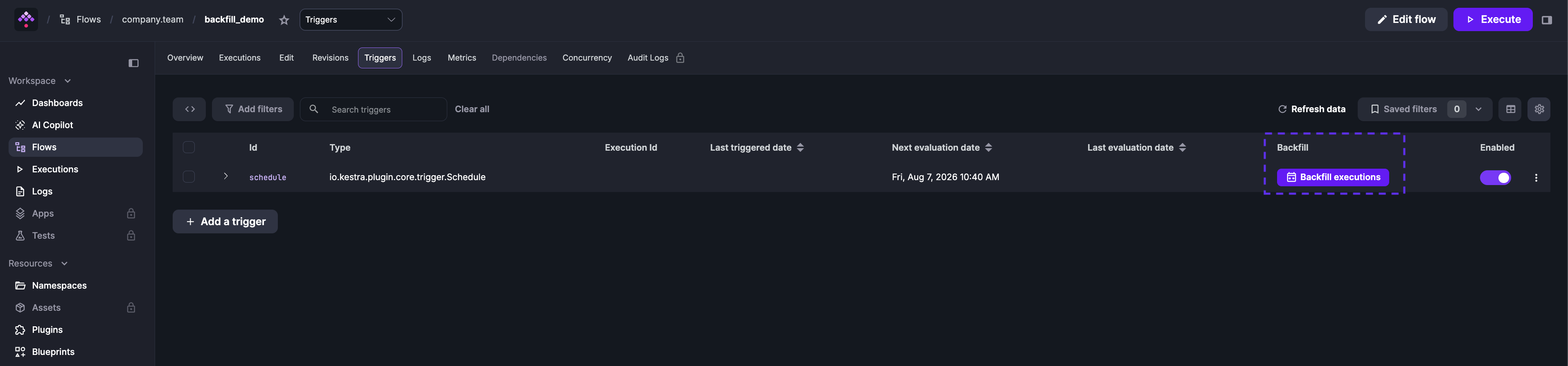
Select the start and end date for the backfill and optionally add custom labels to the executions for tracking.
You can pause and resume the backfill at any time. Click Details to see progress and execution status:
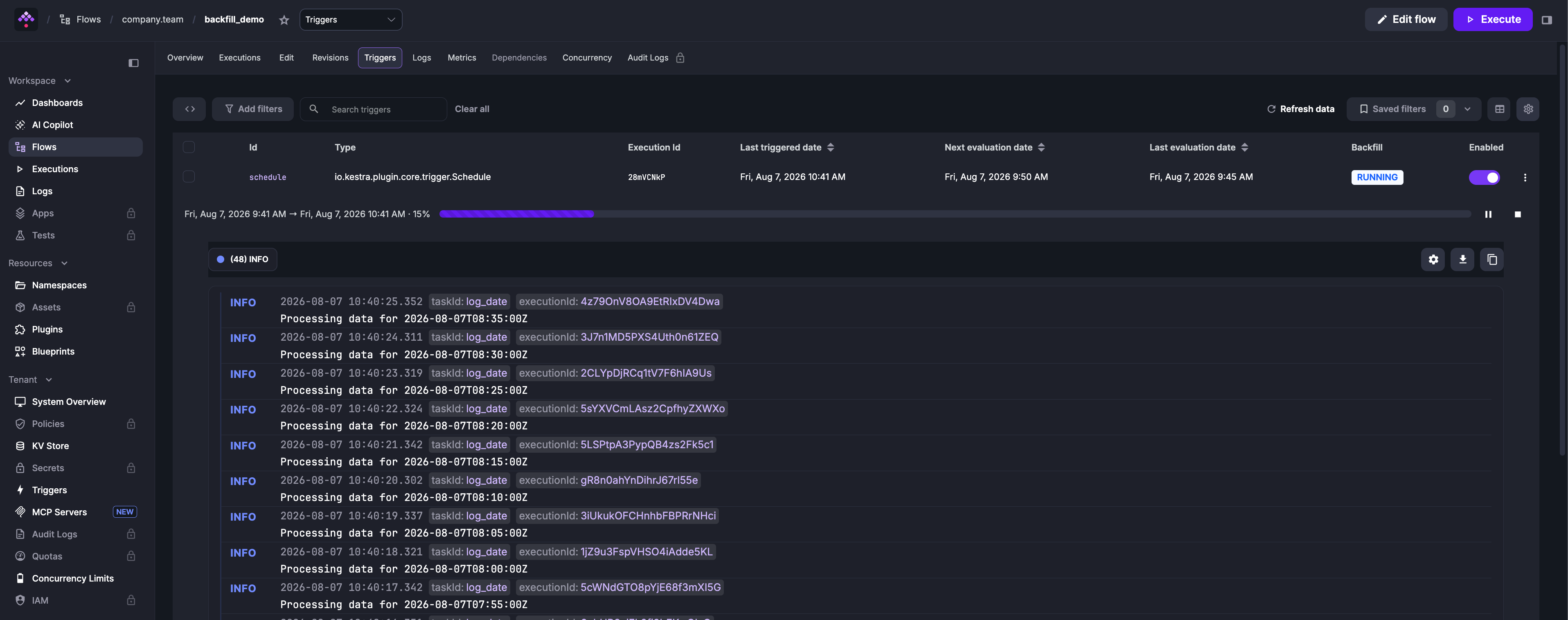
Backfill executions will not be processed if the associated trigger is disabled.
Delete a backfill
Delete a backfill from Tenant → Triggers. Select the trigger and remove the backfill to stop pending replays.
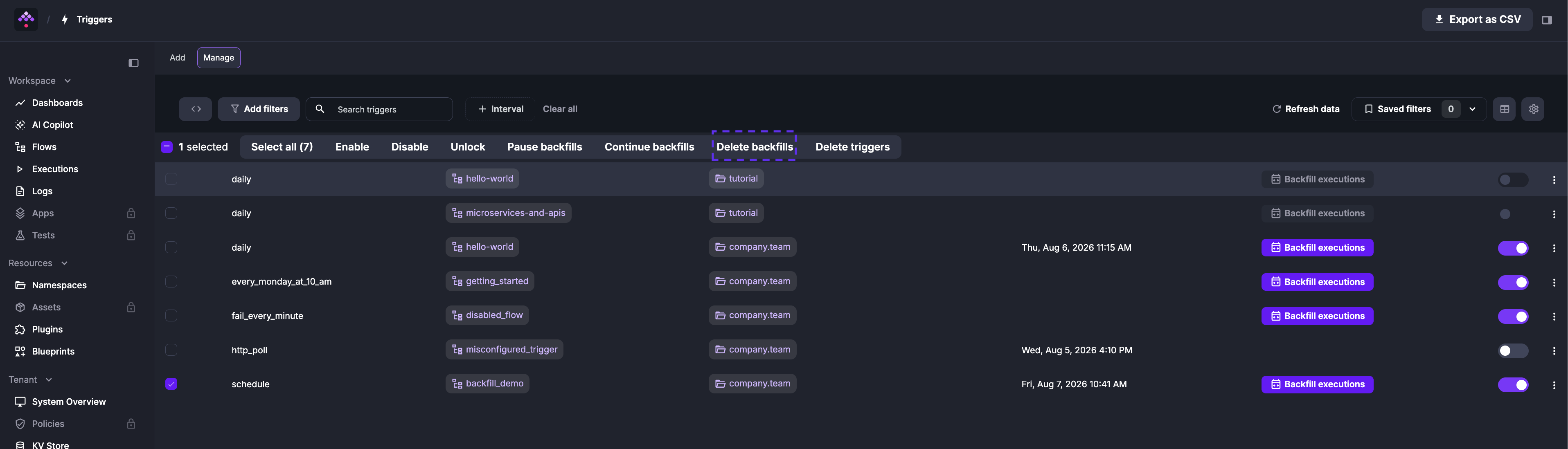
Deleting a backfill only cancels the scheduled catch-up executions. For example, if you defined a * * * * * schedule and backfilled the last five minutes, removing that backfill prevents those five replayed runs from being emitted. This is different from Delete trigger, which clears the trigger state itself — effectively recreating the trigger so it starts evaluating from the current time. Use Delete backfill to stop pending replays, and Delete trigger when you need to reset a stuck trigger or start it fresh.
Trigger backfill via an API call
Using cURL
curl -X PUT http://localhost:8080/api/v1/main/triggers \ -H "Authorization: Bearer $KESTRA_API_TOKEN" \ -H "Content-Type: application/json" \ -d '{ "namespace": "company.team", "flowId": "myflow", "triggerId": "schedule", "backfill": { "start": "2025-04-29T11:30:00Z", "end": null, "labels": [ { "key": "reason", "value": "outage" } ] } }'start is required; end defaults to the current time if omitted. Use inputs to pass flow inputs and labels to tag the resulting executions for tracking. See the API Reference for all available backfill operations.
Using a service account
Available on:
v>=0.15Enterprise EditionCloudUse a Service Account token instead of a user token, and include the tenant in the request header and body:
curl -X PUT http://localhost:8080/api/v1/main/triggers \ -H "Authorization: Bearer $KESTRA_API_TOKEN" \ -H "X-Kestra-Tenant: production" \ -H "Content-Type: application/json" \ -d '{ "namespace": "company.team", "flowId": "myflow", "triggerId": "schedule", "tenantId": "production", "backfill": { "start": "2025-04-29T11:30:00Z", "end": null, "labels": [ { "key": "reason", "value": "outage" } ] } }'Using Python requests
import requestsimport json
url = 'http://localhost:8080/api/v1/main/triggers'
headers = {    'Content-Type': 'application/json'}
data = {  "backfill": {    "start": "2025-06-03T06:30:00.000Z",    "end": None,    "inputs": None,    "labels": [      {        "key": "reason",        "value": "outage"      }    ]  },  "flowId": "myflow",  "namespace": "company.team",  "triggerId": "schedule"}
response = requests.put(url, headers=headers, data=json.dumps(data))
print(response.status_code)print(response.text)When end is None, the backfill runs up to the current time.
Was this page helpful?