
Connect Your LDAP Directory for User Login and Group Sync
For the complete documentation index, see llms.txt. For a full content snapshot, see llms-full.txt. Append.mdto anykestra.io/docs/*URL for plain Markdown.
Enable LDAP authentication to authenticate users against your existing directory, sync group memberships, or both. You can also use LDAP solely for group sync while keeping an existing SSO provider for login.
Configure LDAP authentication
LDAP is a licensed feature. If micronaut.security.ldap.default is configured but your license does not include LDAP, Kestra will refuse to start with the error: LDAP is not supported by your license. Contact your Kestra account team to enable it.
What is LDAP
Lightweight directory access protocol (LDAP) allows applications to quickly query user information. Organizations use directories to store usernames, passwords, email addresses, and other static data. LDAP is an open, vendor-neutral protocol for accessing and managing that data.
With Kestra, you can use an existing LDAP directory to authenticate users and sync them to groups with specific access permissions.
Configuration
LDAP is configured under the security context of your Kestra Security and Secrets configuration file.
LDAP with Micronaut supports context, search, and groups as core configuration properties. These define the connection context, user attribute mapping, and group filtering needed to synchronize users and their group memberships with Kestra.
The user-attributes section maps LDAP attributes such as givenName, sn, and mail to Kestra user properties (first name, last name, and email).
The mode property controls how Kestra uses the LDAP connection:
| Mode | Description |
|---|---|
AUTHENTICATION | LDAP handles user login only. No group sync. This is the default. |
AUTHENTICATION_AND_GROUP_SYNC | LDAP handles both user login and group membership sync. |
GROUP_SYNC_ONLY | LDAP is used only to resolve group memberships. Users log in via an existing SSO provider. |
The examples below extend the base Micronaut LDAP configuration with these Kestra-specific mappings.
Unix configuration
micronaut: security: ldap: default: mode: AUTHENTICATION_AND_GROUP_SYNC # or AUTHENTICATION to skip group sync user-attributes: firstName: givenName lastName: sn email: mail context: server: "ldap://localhost:389" manager-dn: "cn=admin,dc=example,dc=org" manager-password: "LDAP_ADMIN_PASSWORD" search: base: "ou=users,dc=example,dc=org" filter: "(mail={0})" attributes: - "uid" - "givenName" - "sn" - "mail" groups: enabled: true base: "ou=groups,dc=example,dc=org" filter: "{&(objectClass=posixGroup)(memberUid={0})}" filter-attribute: uid attribute: cnWindows configuration
micronaut: security: ldap: default: enabled: true mode: AUTHENTICATION_AND_GROUP_SYNC # or AUTHENTICATION to skip group sync user-attributes: firstName: givenName lastName: sn email: userPrincipalName context: server: "ldaps://<hostname>:636" # ldap://<hostname>:389 for non-TLS manager-dn: "CN=********,CN=Users,DC=domain,DC=local" manager-password: "********" search: base: "DC=domain,DC=local" filter: "(userPrincipalName={0})" attributes: - "sAMAccountName" - "givenName" - "sn" - "userPrincipalName" groups: enabled: true base: "DC=domain,DC=local" filter: "(&(objectClass=group)(member={0}))" filter-attribute: dn attribute: cnKey points for Windows Active Directory:
- Login format: the
userPrincipalNamefilter requires users to log in with their full UPN, e.g.john@domain.local. If your users expect to log in with just their short username (e.g.john), change the filter to(sAMAccountName={0})and update theemailattribute mapping accordingly. - Search base: setting
search.baseandgroups.baseto the root domain (DC=domain,DC=local) covers users and groups across all OUs. Narrow these to a specific OU (e.g.OU=Engineering,DC=domain,DC=local) if you want to restrict access to a subset of your directory. - Group filter attribute: AD
memberattributes store full DNs, sofilter-attribute: dnis required. Without it, Micronaut defaults tocnand group membership lookups will silently return no results. - TLS: use
ldaps://on port 636 in production. Plainldap://on port 389 sends credentials in cleartext. If your AD uses a self-signed certificate, you must add it to the JVM truststore or configure certificate trust in your Kestra deployment.
Finding Windows Active Directory values
Use the following PowerShell commands on your Windows domain controller to look up the values needed for the configuration above.
LDAP server hostname (context.server)
(Get-ADDomainController).HostNameUse the returned hostname as ldaps://<hostname>:636 for TLS or ldap://<hostname>:389 for non-TLS.
Manager DN (context.manager-dn)
([adsisearcher]"(sAMAccountName=Administrator)").FindOne().Properties.distinguishednameReplace Administrator with the service account you intend to use as the bind user. The returned distinguished name (DN) is the value for manager-dn.
User distinguished name
To look up the DN of a specific user (useful for verifying your search.base):
Get-ADUser -Identity "JohnDoe" | Select-Object Name, DistinguishedNameGroups for a user
To list the groups a user belongs to (useful for planning your groups.base and groups.filter):
Get-ADPrincipalGroupMembership -Identity "JohnDoe" | Select-Object Name, DistinguishedNameMembers of a group
To verify the members of a specific group:
Get-ADGroupMember -Identity "CN=Auto,OU=Distro,OU=Groups,DC=kestra,DC=local" | Select-Object sAMAccountName, NameReplace the identity string with the DN of your target group.
Group sync with SSO (GROUP_SYNC_ONLY)
If your users already authenticate via SSO, Basic auth, or Passwordless, you can use LDAP solely to resolve group memberships without changing how users log in. Set mode: GROUP_SYNC_ONLY and configure the groups block. No user-attributes mapping is required.
micronaut: security: ldap: default: mode: GROUP_SYNC_ONLY context: server: "ldap://localhost:389" manager-dn: "cn=admin,dc=kestra,dc=io" manager-password: "LDAP_ADMIN_PASSWORD" search: base: "ou=users,dc=kestra,dc=io" filter: "(mail={0})" groups: enabled: true base: "ou=groups,dc=kestra,dc=io" filter: "(member={0})" attribute: cnWith this configuration:
- Users log in using their SSO provider. LDAP credentials are never checked.
- At each login, Kestra queries the LDAP directory for the user’s group memberships and merges them with any groups sourced from OIDC claims.
- Groups found in LDAP are synced to Kestra using the same rules as standard LDAP group sync — new groups are created automatically, and membership is updated on login.
Two groups properties control how Kestra reads group entries from the directory:
filter: the LDAP search filter used to find groups for a user.{0}is replaced with the user’s distinguished name (DN).attribute: the attribute on the group entry whose value becomes the Kestra group name. Defaults tocn.filter-attribute: the user entry attribute substituted into{0}in the group filter. Usednfor directories that store full DNs in group membership attributes (common in Active Directory). Useuidfor POSIX-style directories.
GROUP_SYNC_ONLY mode requires that the user already exists in Kestra (created on first login). LDAP group sync fires on every subsequent login.
If the LDAP server is unreachable or misconfigured, group sync fails silently — the user logs in successfully but receives no LDAP-sourced groups. Check server connectivity and groups configuration if group assignments are not appearing after login.
LDAP users in Kestra
On first login with LDAP, Kestra validates the user’s credentials against the directory and creates a corresponding user account. If an account already exists, the user authenticates with their LDAP credentials.
If the user belongs to any groups in the directory, those groups are created in Kestra if they don’t exist, and the user is added to each. Group assignments sync only at login — if a user is added to a group in LDAP after their first login, they must log out and back in to pick up the new membership. Any user authenticated via LDAP shows LDAP in the Login & API Tokens column on the IAM → Users page.
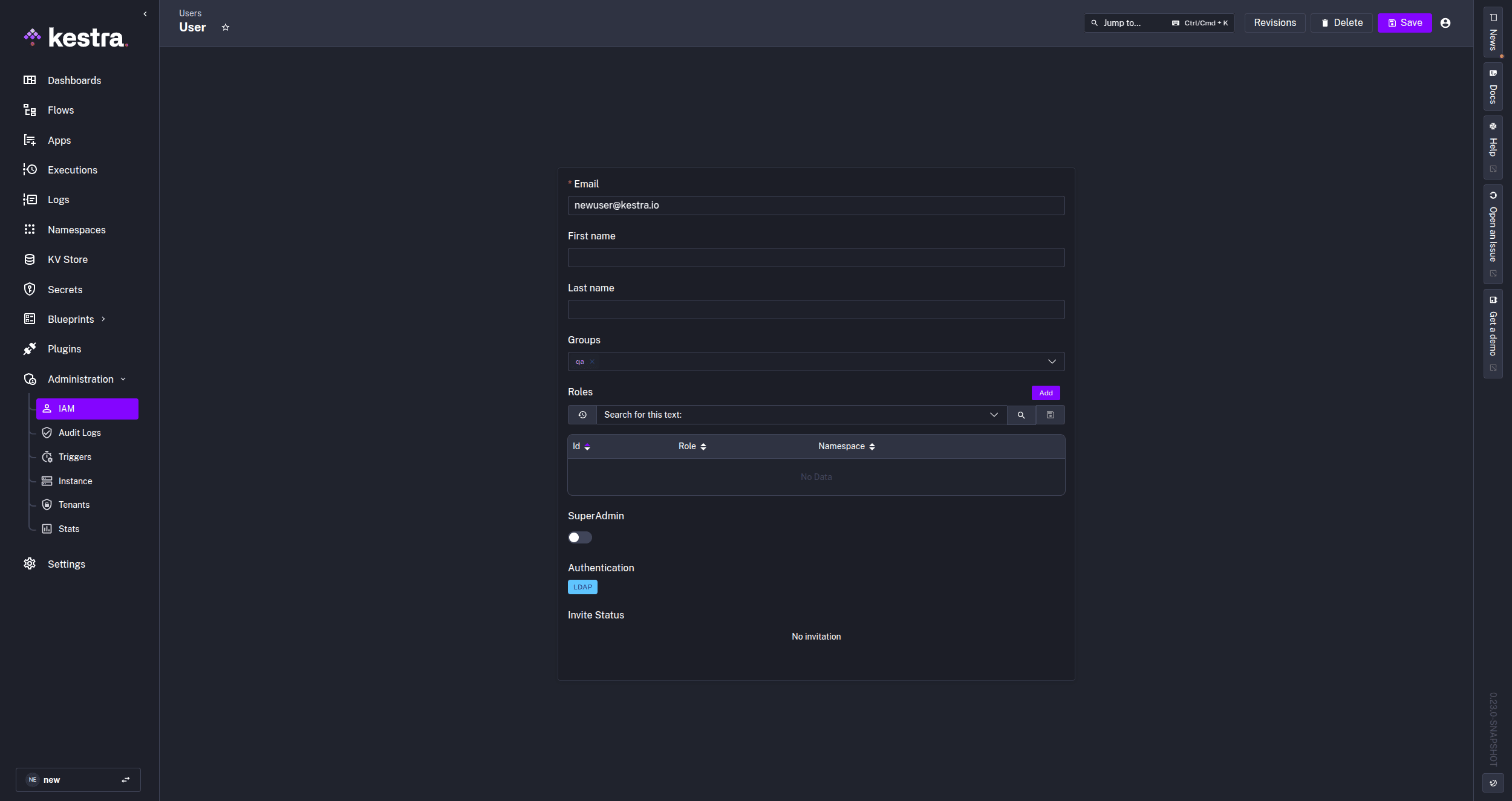
Any updates to a user and their group access on the LDAP server will update in Kestra at the next synchronization (typically at the next login).
Users who log in via SSO with GROUP_SYNC_ONLY mode show their SSO provider in the Login & API Tokens column on the IAM → Users page, not LDAP. The LDAP connection is used only to resolve group memberships in the background.
If a user is deleted from the LDAP server, they will lose access to Kestra at the next synchronization or login attempt.
Was this page helpful?