
Track User Activity and Flow Executions with Audit Logs
For the complete documentation index, see llms.txt. For a full content snapshot, see llms-full.txt. Append.mdto anykestra.io/docs/*URL for plain Markdown.
Audit Logs record every action taken in your Kestra instance by users and service accounts.
Audit logs
By reviewing Audit Logs, system administrators can track user activity, and security teams can investigate incidents and ensure compliance with regulatory requirements.
Why audit logs matter
Audit logs are a historical record that developers and system administrators can use to track changes, monitor system usage, and verify system activity. They track the sequence of activities, ensuring accountability and providing data for troubleshooting and analysis. Because audit logs are immutable, they can also be used to detect and investigate security incidents. If you use the Elasticsearch backend, you can use Kibana to search and visualize your logs.
How to access Audit Logs
You can access Audit Logs from the Tenant section in the UI. That UI page provides a detailed table of recorded events, capturing the actions taken within the system:
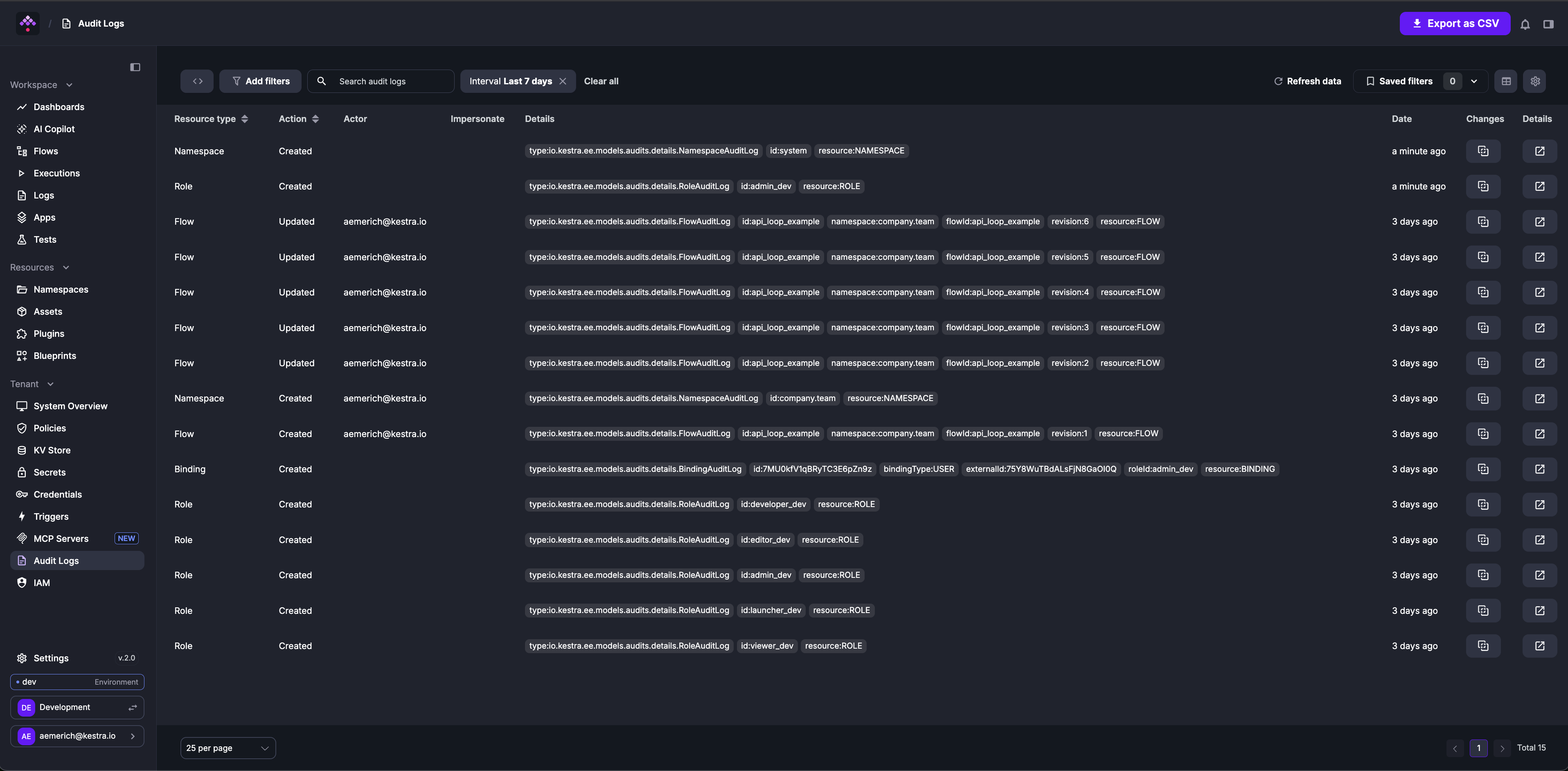
Each row in the table represents a distinct event with several columns providing specific details:
- Resource Type column categorizes the resource that the event is associated with, such as editing a flow (FLOW) or executing it (EXECUTION).
- Action indicates whether a given resource has been created, updated, or deleted.
- Actor identifies who performed the action. The user can be a human, a system, or a service account.
- Details section offers an in-depth description of the event, including identifiers such as the
id,namespace,flowId,executionId, revision, etc. — those fields depend on the type of resource the event is associated with. - Date represents the timestamp of when the event occurred.
- Changes shows two buttons: one to view the revision and a second to link you directly to the resource that created the log.
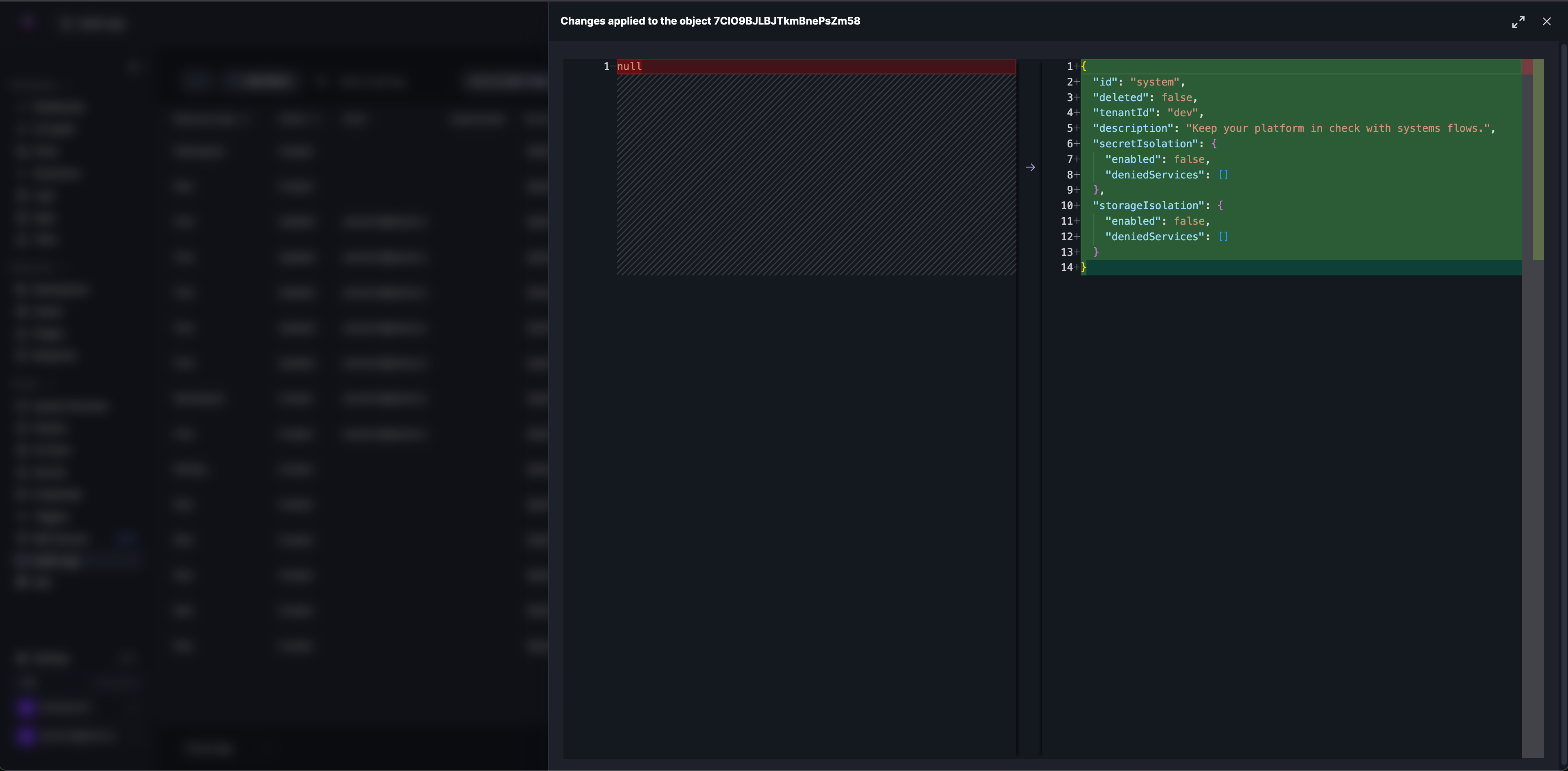
How to see a full diff of a specific event
To see a full diff of a specific event, click the icon in the Changes column. The expanded view shows the full diff of the event side-by-side, including the before and after states of a given resource:
How to filter audit logs
Click Add filters to open the Advanced filter dialog. You can combine multiple conditions — for example, filter by Interval (Last 7 days) and Resource type (NAMESPACE) to narrow the table:
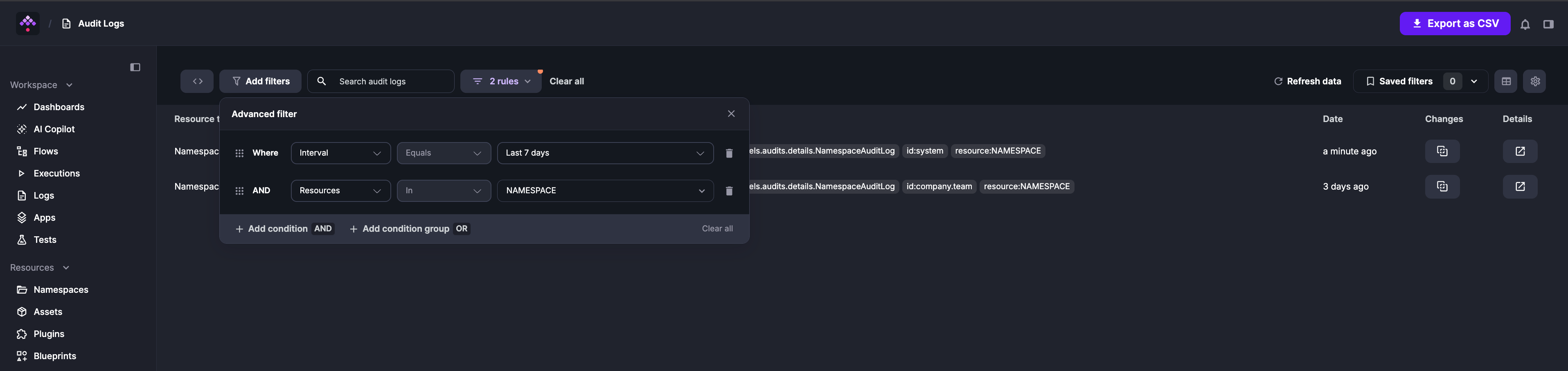
To filter for a specific event, click any tag in the Details column to add it as a filter condition.
How to purge audit logs
The Enterprise Edition of Kestra generates an audit log for every action taken on the platform. While these logs are essential for tracking changes and ensuring compliance, they can accumulate over time and take up a significant amount of space in the database.
The PurgeAuditLogs task removes old audit logs that are no longer needed. You can set a date range for the logs you want to delete, choose a specific namespace, and even filter by resources or actions (CREATE, READ, UPDATE, DELETE).
Additional types of Purge tasks are described in the dedicated section.
Here is the recommended way to implement the audit logs retention policy that purges audit logs older than one month:
id: audit_log_cleanupnamespace: systemtasks: - id: purge_audit_logs type: io.kestra.plugin.ee.core.log.PurgeAuditLogs description: Purge audit logs older than 1 month endDate: "{{ now() | dateAdd(-1, 'MONTHS') }}"Note how the above flow is added to the system namespace, which is the default namespace for System Flows. This ensures that this maintenance flow and its executions are hidden from the main UI, making them only visible within the system namespace that can be managed by platform administrators.
Combining the System Flows functionality with the PurgeAuditLogs task provides a simple way to manage your audit logs as code and from the UI, ensuring you keep them as long as you need to stay compliant while keeping your database clean and performant.
Export audit logs
Audit logs can be forwarded to an external monitoring system such as Datadog, AWS CloudWatch, Google Operational Suite, and more with the Audit Log Shipper task.
Was this page helpful?