
Why Use Task Runners: Isolated Execution & Resource Control
For the complete documentation index, see llms.txt. For a full content snapshot, see llms-full.txt. Append.mdto anykestra.io/docs/*URL for plain Markdown.
Task Runners let you control resource allocation, environment configuration, and deployment targets without changing your task code.
Docker in development, Kubernetes in production
Many Kestra users develop their scripts locally using Docker containers and deploy the same code in production as Kubernetes pods.
The taskRunner property lets you switch execution environments without changing your scripts.
Set the taskRunner property directly on each task. Switching environments means updating the taskRunner block — the script stays identical.
1. Development task (Docker)
- id: transform type: io.kestra.plugin.scripts.python.Script containerImage: python:slim taskRunner: type: io.kestra.plugin.scripts.runner.docker.Docker pullPolicy: IF_NOT_PRESENT cpu: cpus: 1 memory: memory: 512Mi script: | print("running in Docker")2. Production task (Kubernetes)
- id: transform type: io.kestra.plugin.scripts.python.Script containerImage: python:slim taskRunner: type: io.kestra.plugin.ee.kubernetes.runner.Kubernetes namespace: company.team pullPolicy: ALWAYS config: username: "{{ secret(‘K8S_USERNAME’) }}" masterUrl: "{{ secret(‘K8S_MASTER_URL’) }}" caCert: "{{ secret(‘K8S_CA_CERT’) }}" clientCert: "{{ secret(‘K8S_CLIENT_CERT’) }}" clientKey: "{{ secret(‘K8S_CLIENT_KEY’) }}" resources: request: cpu: "500m" memory: "256Mi" script: | print("running in Kubernetes")Notice that containerImage is defined at the task level, not inside taskRunner. Container images typically change more often than the runner setup, so keeping them separate makes both easier to maintain.
In Enterprise Edition, a namespace-scoped Policy can inject the taskRunner block into every task automatically — apply the dev policy to development namespaces and the production policy to production namespaces, with no per-task changes required.
Centralized configuration management (Enterprise Edition)
In Enterprise Edition, use a Policy to centralize task runner credentials at the namespace level. For example, inject AWS credentials into every AWS Batch task runner without repeating them in each flow:
id: aws-batch-credentialsdescription: "AWS credentials for the Batch task runner."enforcement: ACTIVErules: - type: io.kestra.plugin.ee.rules.Add on: PLUGIN where: - field: type operator: EQUAL_TO value: io.kestra.plugin.ee.aws.runner.Batch values: accessKeyId: "{{ secret('AWS_ACCESS_KEY_ID') }}" secretKeyId: "{{ secret('AWS_SECRET_ACCESS_KEY') }}" region: "us-east-1"This ensures consistency and eliminates repetitive configuration across multiple workflows.
Documentation and autocompletion
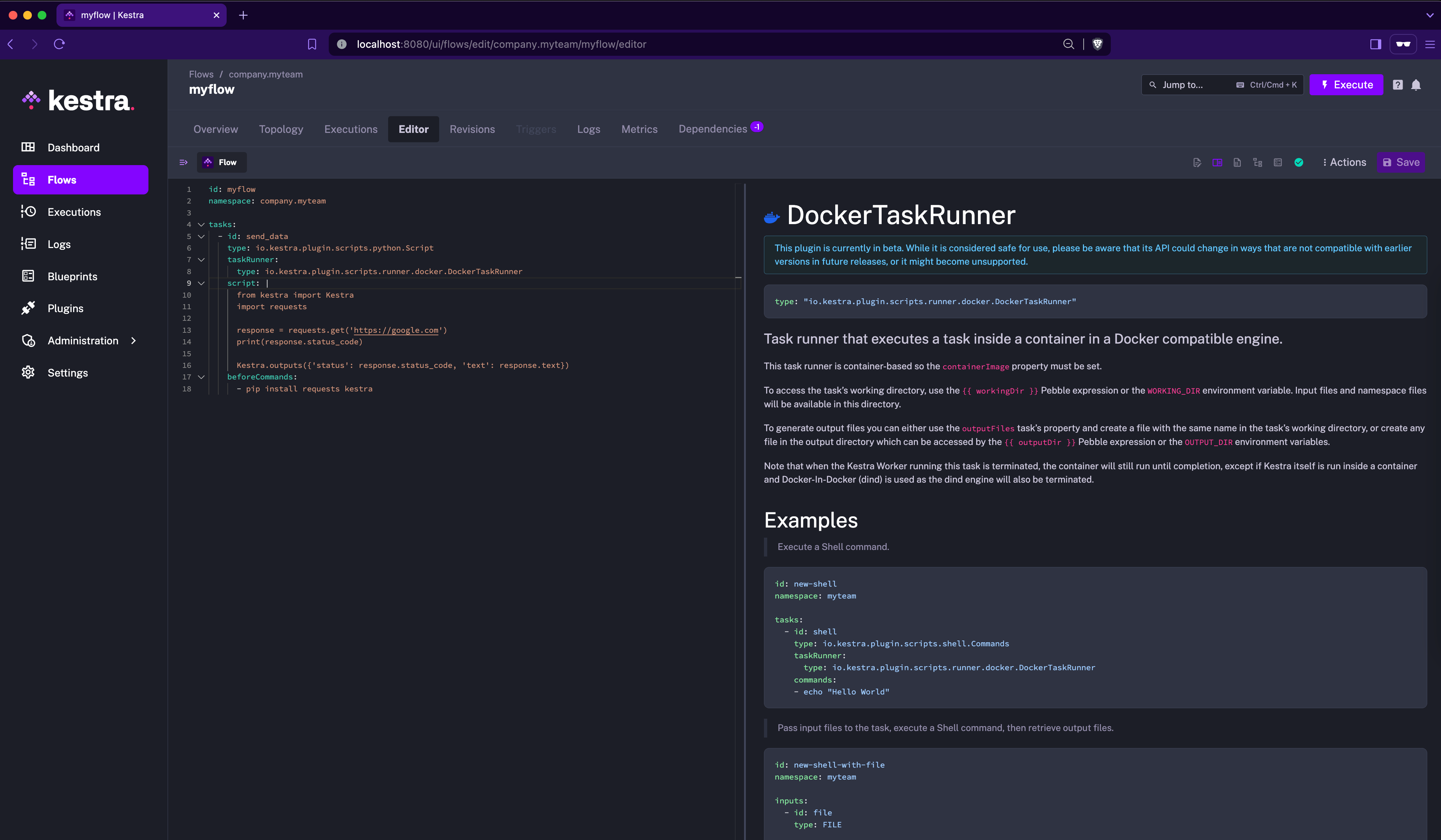
Each task runner is a self-contained plugin with its own icon, documentation, and property schema. The built-in Kestra code editor provides autocompletion, inline documentation, and syntax validation for all runner properties. Clicking on the runner’s name in the editor opens its documentation sidebar for quick reference.
Full customization: build your own Task Runner
For advanced use cases, you can create a custom task runner plugin tailored to your environment.
Simply build it as a JAR file and add it to the plugins directory. Once Kestra restarts, your custom runner will appear as an available option in any script task.
Was this page helpful?