
Trigger Flows from External Apps via Secure Webhook URLs
For the complete documentation index, see llms.txt. For a full content snapshot, see llms-full.txt. Append.mdto anykestra.io/docs/*URL for plain Markdown.
Trigger flows automatically in response to web-based events.
A Webhook trigger generates a unique URL that lets external applications (such as GitHub, Amazon EventBridge, or any system that can send HTTP requests) start new executions in Kestra. Each webhook URL requires a secret key. Store the key value in Kestra Secrets and reference it from the trigger definition — never hardcode a key directly in the flow YAML. Kestra accepts GET, POST, and PUT requests on the webhook URL.
Example
id: triggernamespace: company.team
tasks:  - id: hello    type: io.kestra.plugin.core.log.Log    message: "Hello World! 🚀"
triggers:  - id: webhook    type: io.kestra.plugin.core.trigger.Webhook    key: "{{ secret('WEBHOOK_KEY') }}"
The key is embedded in the webhook URL: /api/v1/main/executions/webhook/{namespace}/{flowId}/{key}. To start the flow:
https://{kestra_domain}/api/v1/main/executions/webhook/{namespace}/{flowId}/{key}Replace kestra_domain, namespace, flowId, and key with your values. You can also copy the webhook URL from the Triggers tab.
Handling the request body
By default, the webhook trigger reads the request body and makes it available as trigger.body. Use the fetchType property to change this behavior.
triggers: - id: webhook type: io.kestra.plugin.core.trigger.Webhook key: "{{ secret('WEBHOOK_KEY') }}" fetchType: FETCH # FETCH (default) | STORE | NONEfetchType | Body handling |
|---|---|
FETCH | Body is read into memory and exposed as trigger.body. Text, JSON, XML, YAML, CSV, and form-urlencoded bodies are decoded as strings or parsed objects. Binary bodies (any other content type) are base64-encoded. This is the default. |
STORE | Body is streamed directly to internal storage without being held in memory. The flow receives a kestra:// URI on trigger.uri. Use this for large payloads or when you do not want body content written into the execution record. |
NONE | Body is read off the connection and dropped. The flow receives neither trigger.body nor trigger.uri. |
File parts in a multipart/form-data request are always stored in internal storage, regardless of fetchType.
Binary and non-text bodies
When a request body has a content type that is not text, JSON, XML, YAML, CSV, or form-urlencoded, FETCH base64-encodes it and stores the result in trigger.body. Pass trigger.body to a script task to decode and process the raw bytes.
id: webhook_binary_bodynamespace: company.team
tasks:  - id: log_body    type: io.kestra.plugin.core.log.Log    message: "base64={{ trigger.body }}"
triggers:  - id: webhook    type: io.kestra.plugin.core.trigger.Webhook    key: "{{ secret('WEBHOOK_KEY') }}"    fetchType: FETCH
Stream large bodies to internal storage
Use STORE to stream the body directly to internal storage without loading it into memory. The flow receives trigger.uri instead of trigger.body.
id: webhook_store_bodynamespace: company.team
tasks:  - id: log_uri    type: io.kestra.plugin.core.log.Log    message: "uri={{ trigger.uri }}"
  - id: measure_body    type: io.kestra.plugin.core.storage.Size    uri: "{{ trigger.uri }}"
triggers:  - id: webhook    type: io.kestra.plugin.core.trigger.Webhook    key: "{{ secret('WEBHOOK_KEY') }}"    fetchType: STORE
When fetchType: STORE, the body is never deserialized. when conditions that reference trigger.body will not work — filter on headers or query parameters instead.
File uploads — multipart/form-data
When a request arrives as multipart/form-data, file parts are stored in internal storage and exposed on trigger.parts. Text fields are exposed on trigger.formFields. This works regardless of fetchType.
Each entry in trigger.parts has the following shape:
trigger: parts: - name: photo filename: result.jpg contentType: image/jpeg size: 20345 uri: kestra:///company/team/executions/5cVhZ…/webhook/0/result.jpg formFields: note: - "looks good"Flow that receives a file upload and measures its size:
id: webhook_multipartnamespace: company.team
tasks:  - id: log_parts    type: io.kestra.plugin.core.log.Log    message: "parts={{ trigger.parts }} fields={{ trigger.formFields }}"
  - id: measure_upload    type: io.kestra.plugin.core.storage.Size    uri: "{{ trigger.parts[0].uri }}"
  - id: log_size    type: io.kestra.plugin.core.log.Log    message: "size={{ outputs.measure_upload.size }}"
triggers:  - id: webhook    type: io.kestra.plugin.core.trigger.Webhook    key: "{{ secret('WEBHOOK_KEY') }}"
Stored bytes are scoped to the execution and purged with it. If no execution is created — for example, because a when condition vetoed the request — stored bytes are cleaned up automatically.
Filtering webhook executions with when
Use the when property to conditionally fire the trigger based on the request body or headers. The when value is a Pebble expression evaluated against the incoming request. If the expression evaluates to a falsy value, Kestra ignores the request and no execution is created.
triggers: - id: webhook type: io.kestra.plugin.core.trigger.Webhook key: "{{ secret('WEBHOOK_KEY') }}" when: "{{ trigger.body.hello == 'world' }}"You can combine multiple criteria in a single expression using and / or:
triggers: - id: webhook type: io.kestra.plugin.core.trigger.Webhook key: "{{ secret('WEBHOOK_KEY') }}" when: "{{ trigger.body.event == 'push' and trigger.headers['x-github-event'] == 'push' }}"Webhook response
By default, the trigger responds immediately with JSON. When the caller needs to wait for the result — for example, a validation handshake that requires text/plain — enable wait and set responseContentType.
triggers: - id: webhook type: io.kestra.plugin.core.trigger.Webhook key: "{{ secret('WEBHOOK_KEY') }}" wait: true returnOutputs: true responseContentType: text/plain # optional, defaults to application/jsonwait: truekeeps the HTTP connection open until the flow finishes or the trigger’s timeout is reached.returnOutputs: truereturns the flow outputs as the HTTP response body.
Return flow outputs in the webhook response
To send task outputs back to the caller in the HTTP response, configure the Webhook trigger to wait for the execution and return outputs. The flow must expose at least one outputs entry.
id: webhook_return_outputsnamespace: company.team
tasks:  - id: make_payload    type: io.kestra.plugin.core.debug.Return    format: "Hello {{ trigger.parameters.name[0] ?? 'world' }}!"
outputs:  - id: greeting    type: STRING    value: "{{ outputs.make_payload.value }}"
triggers: - id: webhook type: io.kestra.plugin.core.trigger.Webhook key: "{{ secret('WEBHOOK_KEY') }}" wait: true returnOutputs: true # optional: responseContentType: "text/plain"- Call the webhook URL with a query parameter (for example
?name=Alice). The execution runs synchronously becausewait: trueis set. - The HTTP response body contains the flow outputs (JSON by default). With the example above, the response includes
"greeting": "Hello Alice!". - Set
responseContentType: "text/plain"when you want the response body to be plain text (ensure the flow returns a single string output, such as from theReturntask).
Test a webhook trigger
To test a webhook trigger without an external tool, go to the flow’s Triggers tab and click Send a test event. The modal lets you post a custom JSON payload and optional headers directly to the webhook URL:
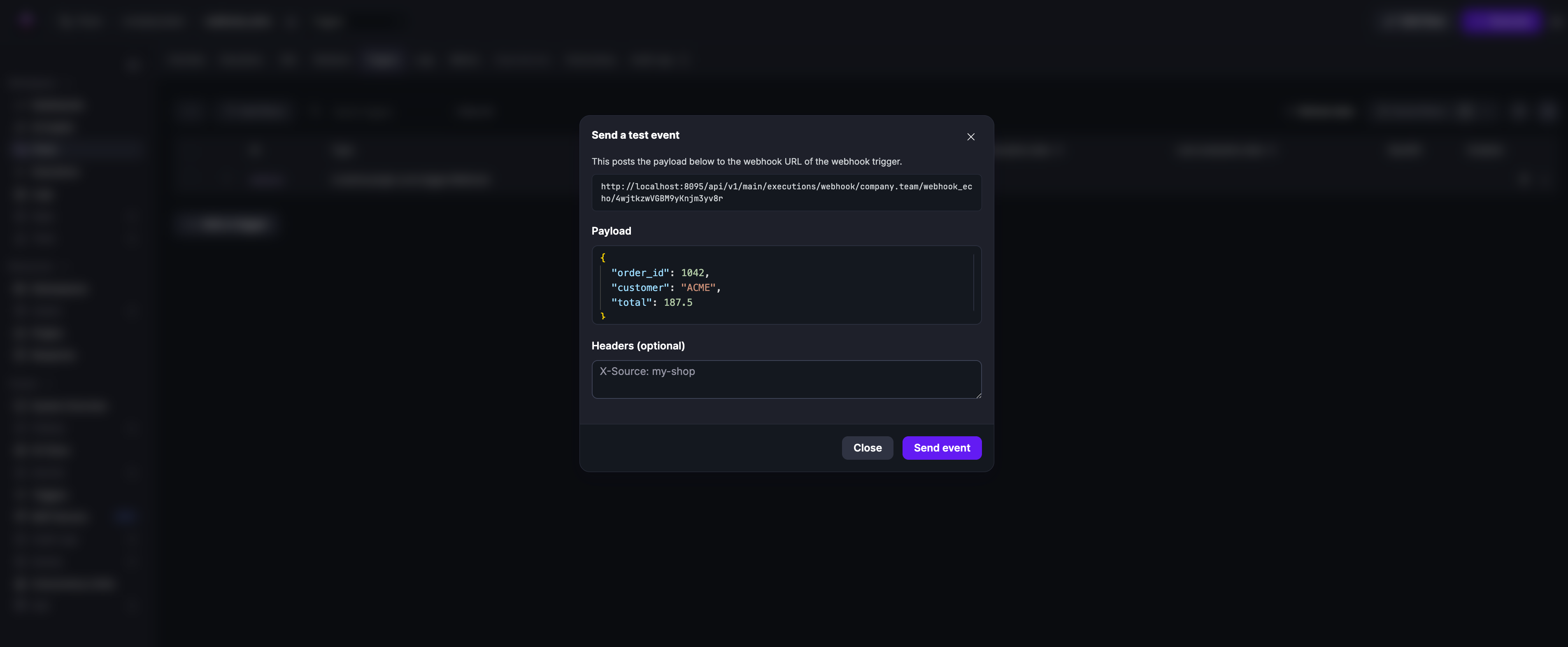
See the Webhook trigger plugin documentation for a full list of properties and outputs.
Was this page helpful?