
Master Branching, Looping & Parallel Execution with Flowable Tasks
For the complete documentation index, see llms.txt. For a full content snapshot, see llms-full.txt. Append.mdto anykestra.io/docs/*URL for plain Markdown.
Run tasks or subflows in parallel, create loops, and conditional branching.
The example flow from earlier in this tutorial extracts data from an API, processes it in a Python script, executes a SQL query, and generates a downloadable artifact on a predefined schedule. Many real-world use cases require branching, looping, or running several tasks simultaneously. Kestra handles these requirements with Flowable tasks.
Tasks from the Core Flow plugin control flow logic. Use them to run tasks in parallel or sequentially, branch conditionally, iterate over items, pause, or allow specific tasks to fail without stopping the execution.
For example, you can use the If task to specify your conditions and define what action to take based on whether those conditions are met.
The example below redesigns the flow to use a SELECT input for product category rather than a STRING URI, while still calling dummyjson. An API request is made based on the selected category — beauty or notebooks (one does not exist).
The check_products If task has a condition of "{{ fromJson(outputs.api.body).products | length > 0 }}" (i.e., checking whether the API body is not empty and contains at least one product). The log message then depends on whether the actual product category exists or not. The then property defines the action for a true condition, and the else property defines the action for a false result.
id: getting_startednamespace: company.team
inputs:  - id: category    type: SELECT    displayName: Select a category    values: ['beauty', 'notebooks']    defaults: 'beauty'
tasks:  - id: api    type: io.kestra.plugin.core.http.Request    uri: "https://dummyjson.com/products/category/{{ inputs.category }}"    method: GET
  - id: check_products    type: io.kestra.plugin.core.flow.If    condition: "{{ fromJson(outputs.api.body).products | length > 0 }}"    then:      - id: log_status        type: io.kestra.plugin.core.log.Log        message: "Found {{ fromJson(outputs.api.body).products | length }} products for category {{ inputs.category }}"      - id: python        type: io.kestra.plugin.scripts.python.Script        containerImage: python:slim        dependencies:          - polars        outputFiles:          - "products.csv"        script: |          import polars as pl          data = {{ outputs.api.body | jq('.products') | first }}          df = pl.from_dicts(data)          df.glimpse()          # Keep a simple view for this category          df.select(["title", "brand", "price"]).write_csv("products.csv")      - id: sqlQuery        type: io.kestra.plugin.jdbc.duckdb.Query        inputFiles:          in.csv: "{{ outputs.python.outputFiles['products.csv'] }}"        sql: |          SELECT brand, round(avg(price), 2) AS avg_price, count(*) AS cnt          FROM read_csv_auto('{{ workingDir }}/in.csv', header=True)          GROUP BY brand          ORDER BY avg_price DESC;        store: true    else:      - id: when_false        type: io.kestra.plugin.core.log.Log        message: "No products found for category {{ inputs.category }}."
triggers: - id: every_monday_at_10_am type: io.kestra.plugin.core.trigger.Schedule cron: 0 10 * * 1Execute the flow twice, once with beauty and once with notebooks to examine the results.
Add a loop to a flow using Flowable tasks
A common orchestration pattern is operating on a set of values. Kestra offers several approaches depending on your use case. The standalone examples below demonstrate each type.
Loop
The Loop flowable task iterates over a list of values and runs child tasks for each item. Each iteration runs as an isolated sub-execution. Access the current value with {{ item.value }} and the zero-based index with {{ item.index }}.
Values can be a static list, a JSON array string, a map, or an ION file URI. The example below makes an API call for each author in the list:
id: loop_examplenamespace: tutorial
tasks:  - id: loop    type: io.kestra.plugin.core.flow.Loop    values: ["pynchon", "dostoyevsky", "hedayat"]    tasks:      - id: api        type: io.kestra.plugin.core.http.Request        uri: "https://openlibrary.org/search.json?author={{ item.value }}&sort=new"
After execution, the Gantt view shows the main Loop task with the sub-executions for each loop through the values list for each author. Click into Iterations to view each loop individually.
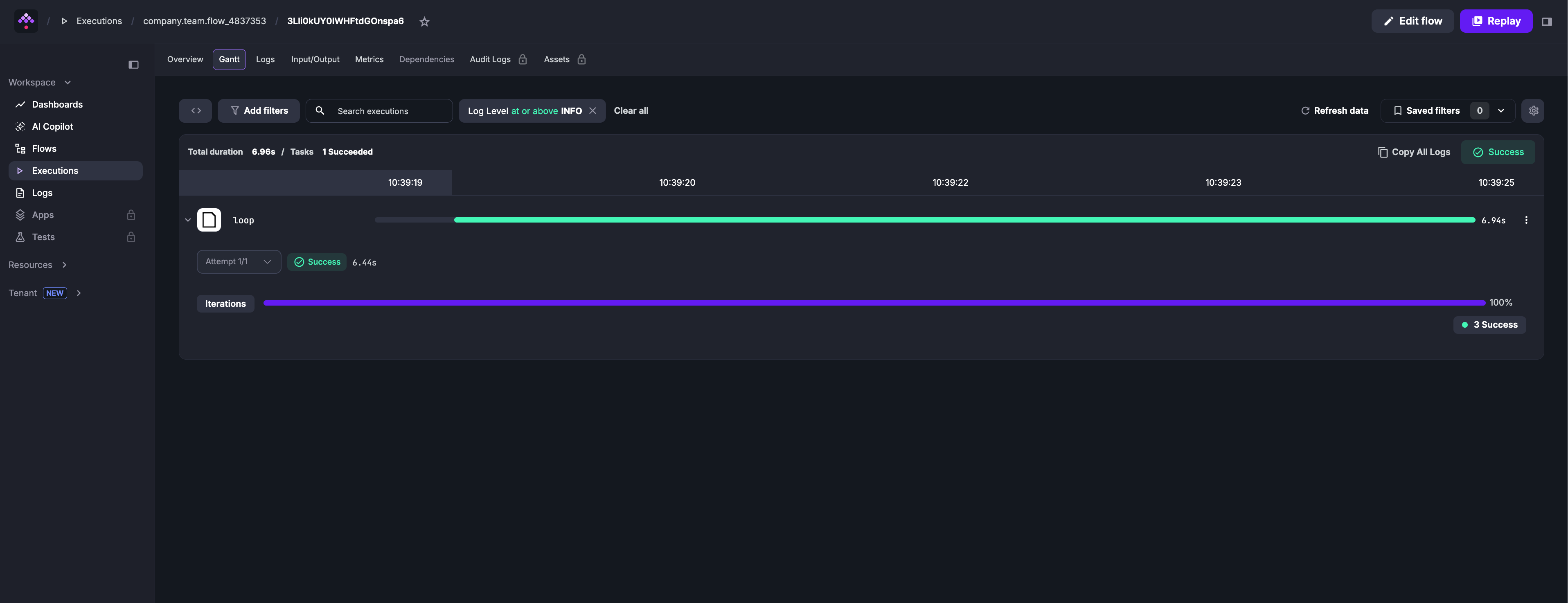
See the Loop documentation for output collection, nested loops, error handling, and map-reduce patterns.
LoopUntil
You can also loop until an external system reports a healthy status. The LoopUntil task reruns its child tasks until a condition becomes true, which is helpful for polling APIs or long-running jobs.
Key options:
condition— evaluated after each run and can reference the latest child outputs (for example{{ outputs.healthCheck.code }}).tasks— the steps executed on every loop iteration.checkFrequency— optional guardrails controlling the poll interval plus maximum iterations or duration.
id: loop_until_health_checknamespace: tutorial
tasks:  - id: loop    type: io.kestra.plugin.core.flow.LoopUntil    condition: "{{ outputs.healthCheck.code == 200 }}"    checkFrequency:      interval: PT30S      maxIterations: 50    tasks:      - id: healthCheck        type: io.kestra.plugin.core.http.Request        method: GET        uri: https://kestra.io
This flow checks an HTTP endpoint every 30 seconds and stops either when it returns 200 or after 50 attempts, whichever comes first. You can reference the child task outputs (here outputs.healthCheck.code) inside the condition expression. See the LoopUntil task documentation for additional options.
Add parallelism using Flowable tasks
A common orchestration requirement is executing independent processes in parallel. For example, you can process data for each partition in parallel. This can significantly speed up the processing time.
The flow below uses the Loop flowable task with concurrencyLimit: 0 to process all partitions simultaneously.
- The
concurrencyLimitproperty set to0removes the cap on parallel iterations. - The
valuesproperty defines the list of items to iterate over. - The
tasksproperty defines the child tasks for each iteration. Access the iteration value with{{ item.value }}.
id: python_partitionsnamespace: company.team
description: Process partitions in parallel
tasks:  - id: getPartitions    type: io.kestra.plugin.scripts.python.Script    taskRunner:      type: io.kestra.plugin.scripts.runner.docker.Docker    containerImage: ghcr.io/kestra-io/pydata:latest    script: |      from kestra import Kestra      partitions = [f"file_{nr}.parquet" for nr in range(1, 10)]      Kestra.outputs({'partitions': partitions})
  - id: processPartitions    type: io.kestra.plugin.core.flow.Loop    concurrencyLimit: 0    values: '{{ outputs.getPartitions.vars.partitions }}'    tasks:      - id: partition        type: io.kestra.plugin.scripts.python.Script        taskRunner:          type: io.kestra.plugin.scripts.runner.docker.Docker        dependencies:          - kestra        script: |          import random          import time          from kestra import Kestra
filename = '{{ item.value }}' print(f"Reading and processing partition {filename}") nr_rows = random.randint(1, 1000) processing_time = random.randint(1, 20) time.sleep(processing_time) Kestra.counter('nr_rows', nr_rows, {'partition': filename}) Kestra.timer('processing_time', processing_time, {'partition': filename})These examples, while simple, demonstrate the flexibility of flowable tasks in both simple and complex workflows.
To learn more about flowable tasks and see more examples, check out the full Flowable tasks documentation. Next, we’ll explore error handling in a flow.
Was this page helpful?