
Track and Resolve Incidents with Cases
For the complete documentation index, see llms.txt. For a full content snapshot, see llms-full.txt. Append.mdto anykestra.io/docs/*URL for plain Markdown.
Track and resolve incidents directly in Kestra, next to the executions that caused them.
When an execution fails, it is often an incident. Cases lets you track and resolve those incidents directly in Kestra, without a separate tool.
Cases are not limited to failures; you can open one for executions that need approvals, or for successful executions that produced unexpected outputs.
The CreateCase task lets you open cases automatically from your flow YAML:
- in the
errors,finally, orafterExecutionblocks, to auto-create custom cases when the execution moves to a terminal state like Failed, Killed, Warning, or Success - anywhere in the regular
tasksblock, to create cases based on custom conditions within the flow, for example if a given output is bad (error status code on some API request).
Not every execution needs to be treated as an independent case, though. Often a single production issue (e.g. an external API that is temporarily unreachable) can easily create 10 to 100 failed executions within an hour. Sending Slack alerts for each failed execution can quickly get so noisy that users mute the channel, making the alerting useless. Cases solve this with deduplication: with linkMatchingExecutions: true, new failing executions are attached to the already-open case for the same flow and task instead of opening a new one.
Cases require the Kestra plugin to be installed on your Kestra EE instance, because the CreateCase task used under the hood by Cases comes from this plugin. The default Docker image with plugins included already contains it. If you manage plugins yourself, install the Kestra plugin through Versioned Plugins to use Cases reliably.
What a case contains
- Title and description: the description supports Markdown
- Severity:
Critical,High,Medium, orLow; defaults toMedium - Status:
Open,Acknowledged,Investigating,Resolved, orCancelled;ResolvedandCancelledare terminal - Namespace: every case belongs to a namespace, and all permission checks are scoped to it
- Assignees and watchers: both accept users and groups; assignees are responsible for the case, watchers only receive notifications. The same user or group cannot be both at once — assigning them as an assignee removes them from the watchers
- Custom fields: typed fields (Text, Select, Multi-select) defined per case or inherited from a template; cases use custom fields instead of labels
- SLAs: optional acknowledgement and resolution targets
- Linked executions and assets: the executions and assets affected by the incident
- Case actions: flows attached to the case as one-click remediation buttons
- Origin: the flow, task, and execution that created the case (set only when created by the
CreateCasetask); this is the deduplication key - Template reference: the case template the case was created from, if any
Case lifecycle
There is no restrictive state machine: any status can be changed to any other, including reopening a resolved or cancelled case. A few rules apply:
- Resolving requires a resolution reason; the note is optional. When the case was created from a template, the template can restrict the allowed reasons and make the note mandatory. Without a template, the built-in reasons are offered: Fixed, Workaround applied, Configuration change, Duplicate, No action needed, Won’t fix.
- Cancelling accepts an optional reason and note.
- The first time the case moves from
Opento any other status, the acknowledgement time is recorded (this satisfies the acknowledgement SLA and is kept even if the case is later reopened). - Reopening a terminal case clears the resolution, and the case’s auto-attach flow (if any) is recreated.
SLAs
Each case can have two optional SLA targets, set directly or inherited from a template:
- Acknowledgement: met the first time the case moves from
Opento any other status - Resolution: met when the case is resolved
Both clocks start at case creation. Each of the two SLAs can be in one of six states: Not started, Running, Overdue, Met, Missed, or Voided (cancelling a case voids its pending SLAs). States are computed at read time and never persisted. The UI shows a live countdown (“Due in 2h”, “Due 30m ago”) on the case detail page, board cards, and the list’s Resolution SLA column.
When a target is missed, a background check records an SLA_ACKNOWLEDGEMENT_BREACHED or SLA_RESOLUTION_BREACHED event in the case’s timeline and sends an in-app notification to the case’s assignees and watchers. The check runs every 5 minutes by default and can be tuned or disabled through the kestra.cases.sla-breach-check configuration; each of the two SLAs is notified at most once per case.
The CreateCase task
The task type is io.kestra.plugin.kestra.ee.cases.CreateCase. It is an SDK-based task that calls the Kestra API, so it can be placed in any task block: tasks, errors, finally, or afterExecution.
id: orders_syncnamespace: company.team
tasks:  - id: sync    type: io.kestra.plugin.core.http.Request    uri: https://api.example.com/orders
errors:  - id: open_case    type: io.kestra.plugin.kestra.ee.cases.CreateCase    kestraUrl: http://localhost:8080    auth:      apiToken: "{{ secret('KESTRA_API_TOKEN') }}"    title: "Orders sync failed: {{ flow.id }}"    severity: HIGH    linkMatchingExecutions: true    sla:      acknowledgement: PT1H      resolution: PT8H
The task calls the Kestra API, so it needs an endpoint and credentials. kestraUrl defaults to the URL of the current instance, and auth accepts either an apiToken or a username and password pair. Both can also be omitted: an administrator can set Default authentication credentials when editing a namespace or tenant, and those credentials are then used automatically (the instance configuration kestra.tasks.sdk.authentication works as a global fallback). Without auth on the task and without such defaults, the task fails at runtime.
For condition-based cases inside the regular tasks block, combine it with runIf:
tasks:  - id: check    type: io.kestra.plugin.core.http.Request    uri: https://api.example.com/health    allowFailed: true
  - id: open_case    type: io.kestra.plugin.kestra.ee.cases.CreateCase    kestraUrl: http://localhost:8080    auth:      apiToken: "{{ secret('KESTRA_API_TOKEN') }}"    runIf: "{{ outputs.check.code != 200 }}"    title: "Health check returned {{ outputs.check.code }}"    severity: CRITICAL
Properties
| Property | Description |
|---|---|
title | Case title; required unless caseId is set. Supports expressions. |
caseDescription | Markdown description (named this way because description is reserved for the task itself). |
severity | CRITICAL, HIGH, MEDIUM, or LOW; defaults to MEDIUM. |
status | Initial status; defaults to OPEN. |
namespace | Namespace the case belongs to; defaults to the flow’s namespace. |
sla | acknowledgement and resolution durations (ISO-8601, e.g. PT1H). |
linkMatchingExecutions | When true, the execution is attached to an already-open case with the same origin instead of creating a new one; defaults to false. |
caseId | Attach the execution to this exact case instead of creating one (used by generated auto-attach flows). |
executionId | Execution to link; defaults to the current execution. |
assignees / watchers | User emails and group names, resolved to stable IDs on the server. |
labels | Key/value pairs, stored as Text custom fields on the case. |
assetIds | Assets to link to the case. |
actions | Case actions to attach, each with label, namespace, and flowId. |
Connection properties (kestraUrl, auth, tenantId) are shared by all tasks from the Kestra plugin; tenantId defaults to the execution’s tenant. Authentication is resolved as described above: auth set on the task takes precedence, then the namespace’s default authentication credentials, then the tenant’s, then the instance configuration.
Outputs
The task returns caseId and created. created: false means the execution was attached to an existing case (via deduplication or caseId) rather than opening a new one.
Note that the task cannot reference a case template. Case templates are mainly helpers to make it easier to configure cases from the UI; when creating cases from code, all properties such as severity or SLAs are declared explicitly on the task, following Kestra’s declarative nature.
Deduplication
With linkMatchingExecutions: true, the server first looks for an active case with the same origin: the combination of flow namespace, flow ID, and task ID (within the tenant). The title is not part of the key. A case counts as active when its status is Open, Acknowledged, or Investigating.
- On a match: the triggering execution is appended to the existing case’s linked executions (visible in the timeline as an
EXECUTION_LINKEDevent), no new case is created, and the task returnscreated: false. Fields such as title or severity are not merged, and no new “created” notification is sent. - On no match: a new case is created with the origin recorded, and the execution is linked to it.
The same behavior can also be enabled from the UI on an existing case with auto-attach.
One caveat: the deduplication check is not atomic. The server first checks for an existing case and then creates one, so two executions of the same task failing at exactly the same moment can each create their own case.
Auto-attach
Auto-attach allows you to avoid getting a new case and a new notification for every single failed execution. A case is created for the first failure, and all following executions matching the same flow and state are automatically attached to that same case until the case is resolved or cancelled.
Deduplication with linkMatchingExecutions achieves the same from the flow YAML; auto-attach is its UI counterpart, configured on an existing case. It can be enabled with the “Auto-link matching executions” toggle when attaching executions to a case, from the case detail page or in the Create Case modal. A banner then lists exactly what will be matched, for example “New executions matching company.team/orders_sync (FAILED) will automatically attach to this case.” Several executions can be selected at once, even across different flows: the selection is grouped into one rule per flow, and the states of that flow’s selected executions are combined.
Under the hood, enabling it generates a flow named attach_executions_<caseId> in the system namespace, with one Flow trigger per (namespace, flow, states) rule and a single CreateCase task that passes the caseId. Multiple rules accumulate on the same generated flow. The flow is deleted when the case reaches a terminal status or is deleted, and recreated on reopen. These generated flows are visible on the System Flows page.
Enabling auto-attach is gated by RBAC: it requires the UPDATE action on the CASE permission in the case’s namespace, plus the EXECUTE action on the FLOW permission in the namespace of the flow whose executions will be attached.
Creating cases from the UI
Besides the task, cases can be created in four places:
- Cases page: the Create button opens a modal with template selection, title, severity, initial status, namespace, assignees and watchers, both SLA targets (presets from 1 hour to 72 hours, or a custom duration), description, custom fields, and executions to link.
- Executions page (bulk): select executions and use “Create case from selection” or “Add to existing case”. Both also work with “select all matching filter”, so a case can be created from everything matching the current query.
- Execution’s Overview tab: a “Linked cases” panel lists the cases the execution belongs to and offers a Create case button pre-linked to that execution.
- Asset page: the same panel exists on the asset overview; a case created there is linked to the asset automatically.
Cases in the UI
Cases sit in the left menu between Executions and System Flows.
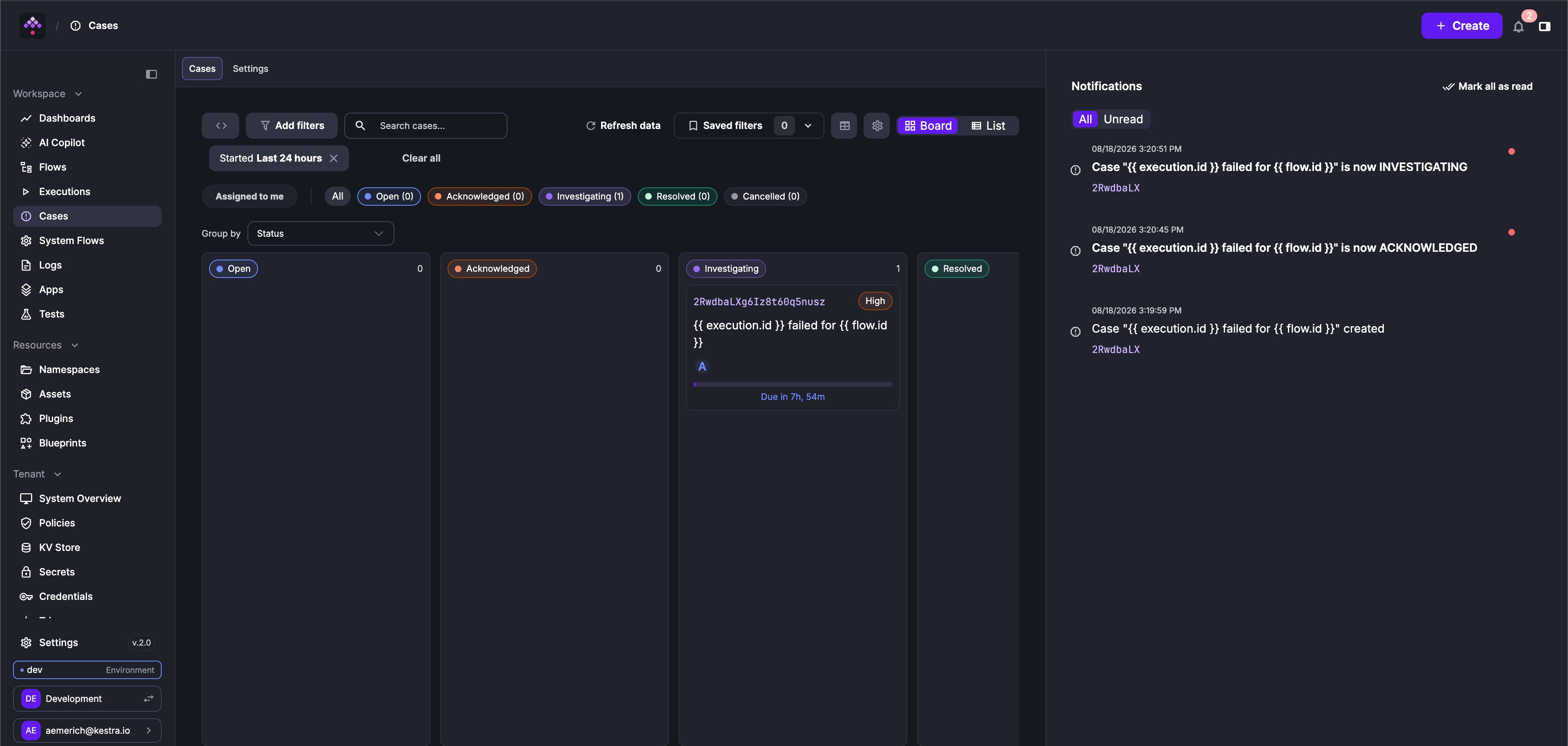
- Board view (default): a kanban board grouped by status, severity, or assignee. Dragging a card between columns updates the case; dropping onto Resolved opens the resolve modal, because a reason is mandatory. Cards show the case ID, severity, title, assignees, and a live SLA countdown.
- List view: columns for Case, Title, Severity, Status, Resolution SLA, and Assignee, with an inline next-step button per row (Acknowledge, Investigating, Resolve) and bulk Acknowledge/Delete.
- Toolbar: full-text search; filters on namespace, status, severity, assignee, and time range; an “Assigned to me” toggle; and one chip per status with live counts.
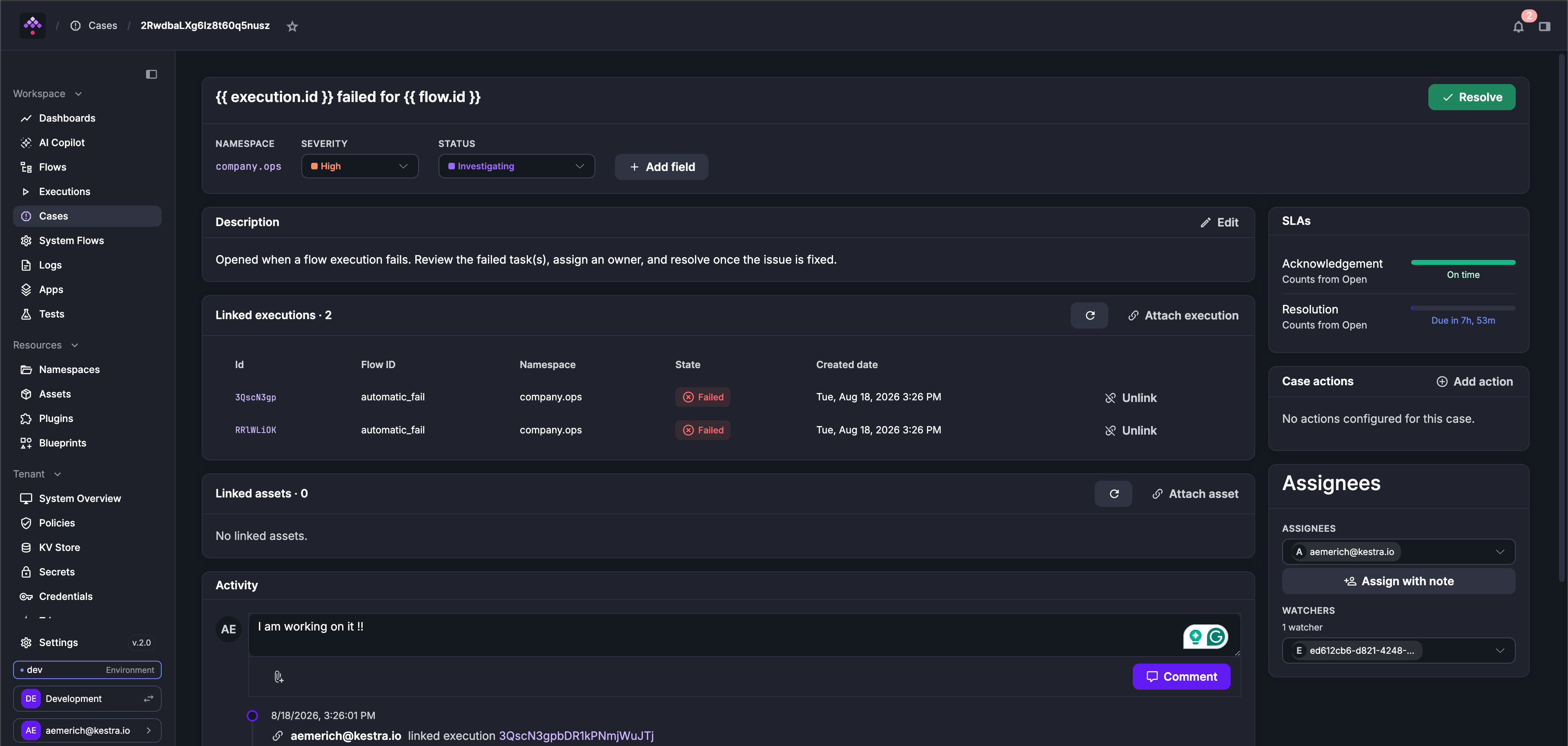
The case detail page shows the editable header (title, severity, status, quick transitions, Resolve/Reopen), the Markdown description, custom fields, a resolution card once resolved, SLA countdowns, assignees and watchers (with a Watch/Unwatch toggle and “Assign with note”), case actions, linked executions, linked assets, and the activity timeline.
Comments and activity timeline
Every change to a case is recorded as a timeline event: creation, field updates, status and severity changes, assignments (with optional note), execution and asset links, action runs, auto-attach changes, and SLA breaches. Comments support Markdown and up to 5 file attachments of 10 MB each (drag-and-drop and clipboard paste work).
Case actions
A case action is a flow attached to the case as a one-click button, intended for remediation or diagnostics (e.g. “Restart service”). Clicking an action opens the Execute flow modal so you can review and fill the flow’s inputs, and optionally set labels, a schedule date, or breakpoints before running. The resulting execution is automatically linked back to the case and labeled system.caseId: <caseId> and system.from: case, and the run is recorded in the timeline. Attaching or running an action requires the EXECUTE action on the FLOW permission in the target flow’s namespace.
Linked executions and assets
- Executions can be linked by the task, by auto-attach, manually from the case detail page, or in bulk by ID or by filter query. The linked-executions card shows each execution’s live state and keeps a row (marked as no longer existing) even if the execution was purged.
- Assets come in two kinds: explicitly attached ones, and derived ones (assets used by the case’s linked executions, shown with an “Auto-detected” tag). Derived assets cannot be unlinked; they disappear when the executions that reference them are unlinked.
Case templates
Templates standardize how cases are created. A template can define a default severity, default assignees and watchers, a title pattern (supporting the same expressions as the task title), a description, both SLA targets, custom field definitions, default case actions, allowed resolution reasons, and whether a resolution note is required. One template per tenant can be marked as the default; it is preselected in the Create Case modal.
Templates are managed in Cases → Settings and require the TEMPLATE action on the CASE permission.
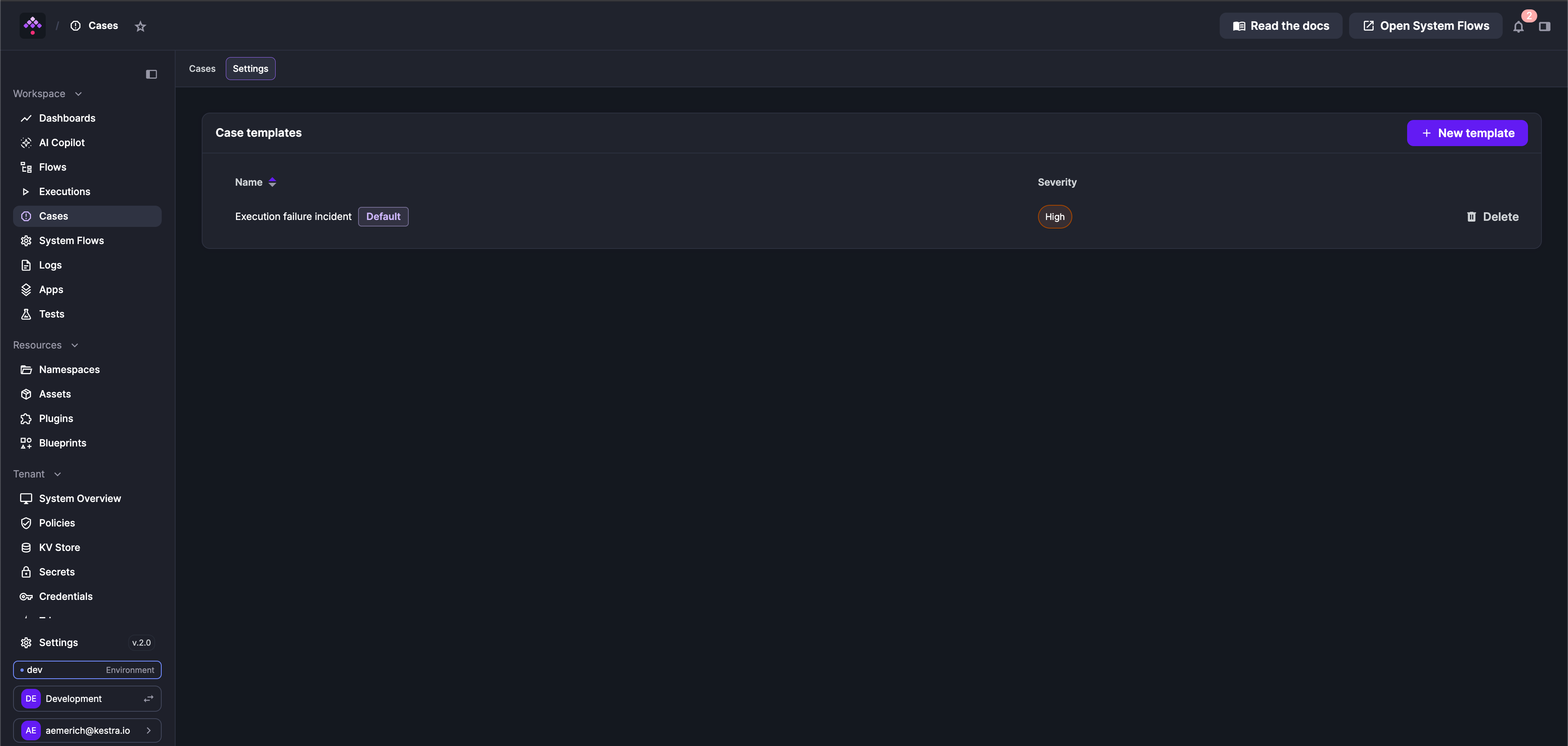 A template can be scoped to a namespace or left tenant-wide (tenant-wide templates and the default flag require a global grant).
Every tenant is seeded with a built-in “Execution failure incident” template: severity High, title pattern {{ execution.id }} failed for {{ flow.id }}, 1 hour acknowledgement and 8 hour resolution SLA, and the built-in resolution reasons.
Template defaults apply when creating cases via the UI or the API; they cannot be used by the CreateCase task, where all properties are declared explicitly in the flow YAML.
Notifications
Case events are wired into the in-app notification system (the bell icon). Seven events send notifications: case created, assigned, status changed, severity changed, commented, acknowledgement SLA breached, and resolution SLA breached. Recipients are the case’s assignees and watchers, with groups expanded to their members; assignment notifications go only to the users whose assignment actually changed, with the assignment note included. Each notification contains a link to the case.
Permissions and audit
- RBAC: a new
CASEpermission resource with actionsVIEW,LIST,CREATE,UPDATE,DELETE,FOLLOW, andTEMPLATE, optionally scoped to a namespace (creating a case requiresCREATEon its namespace, transitions and linking requireUPDATE, commenting only requiresVIEW). - Audit: create, update, and delete of cases and case templates are recorded in the audit log (resource types
CASEandCASE_TEMPLATE). Timeline events and comments are not separately audited. - Backup: cases, templates, timeline events, and execution links are included in backup and restore.
API
All case operations are available via REST under /api/v1/{tenant}/cases. The calls below cover the most common integration patterns. For the full endpoint list, request shapes, and filter DSL, see the Enterprise API reference.
Search cases
curl -X GET "https://{host}/api/v1/{tenant}/cases/search?page=1&size=25" \ -H "Authorization: Bearer {token}"Accepts filters (a list of structured query filter objects), sort, and dateFilter as query parameters. Use GET /cases/counts to get a {status: count} breakdown without pagination.
Create a case
curl -X POST "https://{host}/api/v1/{tenant}/cases" \ -H "Authorization: Bearer {token}" \ -H "Content-Type: application/json" \ -d '{ "namespace": "company.team", "title": "Orders sync failed", "severity": "HIGH", "sla": { "acknowledgement": "PT1H", "resolution": "PT8H" } }'Returns the full case object including the generated id.
Acknowledge and resolve
# Acknowledgecurl -X POST "https://{host}/api/v1/{tenant}/cases/{id}/acknowledge" \  -H "Authorization: Bearer {token}"
# Resolvecurl -X POST "https://{host}/api/v1/{tenant}/cases/{id}/resolve" \  -H "Authorization: Bearer {token}" \  -H "Content-Type: application/json" \  -d '{ "reason": "Fixed", "note": "Deployed hotfix v1.2.3" }'
A reason is required to resolve. The reason is a free-form string; case templates can configure a resolutionReasons list to restrict which values are accepted.
Link executions
curl -X POST "https://{host}/api/v1/{tenant}/cases/{id}/executions" \ -H "Authorization: Bearer {token}" \ -H "Content-Type: application/json" \ -d '["execution-id-1", "execution-id-2"]'Use POST /cases/{id}/executions/by-query to link everything matching a filter query (capped at 1,000).
Look up cases by execution
curl -X POST "https://{host}/api/v1/{tenant}/cases/by-executions" \ -H "Authorization: Bearer {token}" \ -H "Content-Type: application/json" \ -d '["execution-id-1", "execution-id-2"]'Returns { "executionId": [caseSummary, ...] }, useful for annotating an execution list with its linked cases.
Add a comment
curl -X POST "https://{host}/api/v1/{tenant}/cases/{id}/comments" \ -H "Authorization: Bearer {token}" \ -F 'comment={"message":"Restarted the service, monitoring now."};type=application/json'Supports up to 5 file attachments (10 MB each) as additional -F file=@path parts.
Current limitations
- Notifications are in-app only: case events appear in the notification bell, but no Slack message or email is sent by Cases. External alerting can be added with standard notification tasks alongside
CreateCase, or as a case action. - Deduplication is not atomic: concurrent failures of the same task can occasionally create duplicate cases.
Was this page helpful?