
Understand Every Execution State from Created to Success
For the complete documentation index, see llms.txt. For a full content snapshot, see llms-full.txt. Append.mdto anykestra.io/docs/*URL for plain Markdown.
States represent where an execution or task run is in its lifecycle. Each state determines what Kestra does next — whether to continue, retry, wait for input, or terminate. For a broader overview of executions, see the Execution documentation.
Execution states
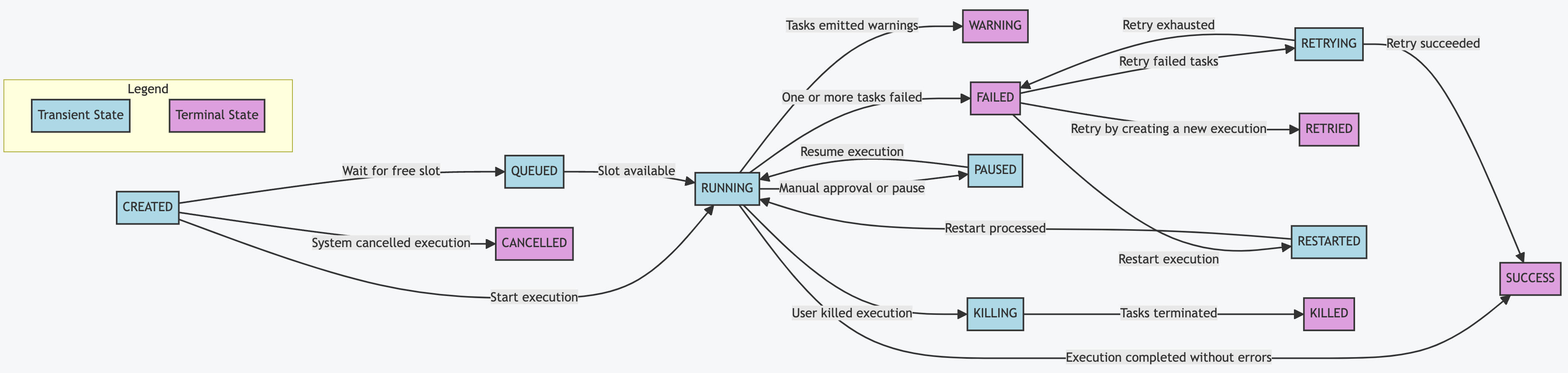
| State | Type | Description |
|---|---|---|
CREATED | Transient | Created but not yet started. Transitions quickly to RUNNING, QUEUED, or CANCELLED. Executions stuck here may indicate a system issue. |
QUEUED | Transient | Waiting for a free slot. Only occurs when concurrency limits are set and all slots are occupied. |
RUNNING | Transient | Currently in progress. Continues until all task runs complete. |
PAUSED | Transient | Awaiting manual approval or a fixed delay before continuing. Transitions directly back to RUNNING when resumed — there is no RESUMING or RESUMED state. |
RESTARTED | Transient | Equivalent to CREATED but for a failed execution that has been manually restarted from the UI. Transitions to RUNNING once processed. |
RETRYING | Transient | One or more failed task runs are being retried under a flow-level retry policy. Transitions to SUCCESS, WARNING, or FAILED once all attempts are exhausted. |
KILLING | Transient | The user has issued a kill command. The system is terminating any task runs still in progress. Transitions to KILLED once all task runs are terminated. |
SUCCESS | Terminal | All tasks completed without errors, or any failures were explicitly allowed. |
WARNING | Terminal | Completed successfully, but one or more tasks emitted warnings. |
FAILED | Terminal | One or more tasks failed and will not be retried. If an errors handler is defined, its tasks run before the execution ends. With a flow-level retry policy set to RETRY_FAILED_TASK, the execution transitions to RETRYING instead. |
RETRIED | Terminal | The original execution failed and was retried under a flow-level retry policy set to CREATE_NEW_EXECUTION. The original execution is marked RETRIED and a new execution is created in its place. |
CANCELLED | Terminal | Automatically cancelled by the system because the concurrency limit was reached and behavior was set to CANCEL. |
KILLED | Terminal | Killed on request by the user. No further tasks will run. |
CANCELLED vs. KILLED
Both are terminal states that stop an execution, but they have different causes:
CANCELLED— triggered by the system when the concurrency limit is reached andbehavior: CANCELis configured. No user action required.KILLED— triggered by the user via the Kill button in the UI or an API call. The execution first passes throughKILLINGwhile in-progress task runs are terminated, then settles inKILLED.
Task run states
Task run states represent the status of a single task run within an execution. The lifecycle is similar but not identical — task runs have a SUBMITTED state (queued to a Worker) that executions do not, and executions have QUEUED, CANCELLED, and PAUSED states that task runs do not.
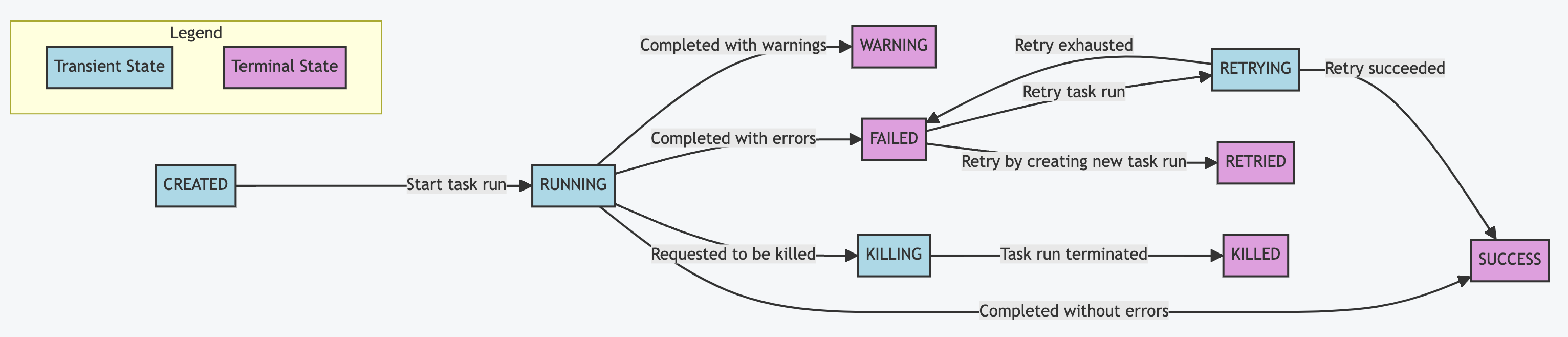
| State | Description |
|---|---|
CREATED | Created but not yet started. |
SUBMITTED | Submitted to a Worker but not yet running. |
RUNNING | Currently in progress. |
SUCCESS | Completed successfully. |
WARNING | Completed with warnings. |
FAILED | Failed. |
RETRYING | Being retried. |
RETRIED | Retried and superseded by a new attempt. |
RESTARTED | Being restarted. |
KILLING | Kill in progress. |
KILLED | Killed on request by the user. |
Was this page helpful?